Free Monthly Budget Tracker Excel Template
Take control of your money with a budget spreadsheet that does the math for you. Log transactions once and watch category totals, remaining balances, and your bottom line update automatically.
What's inside
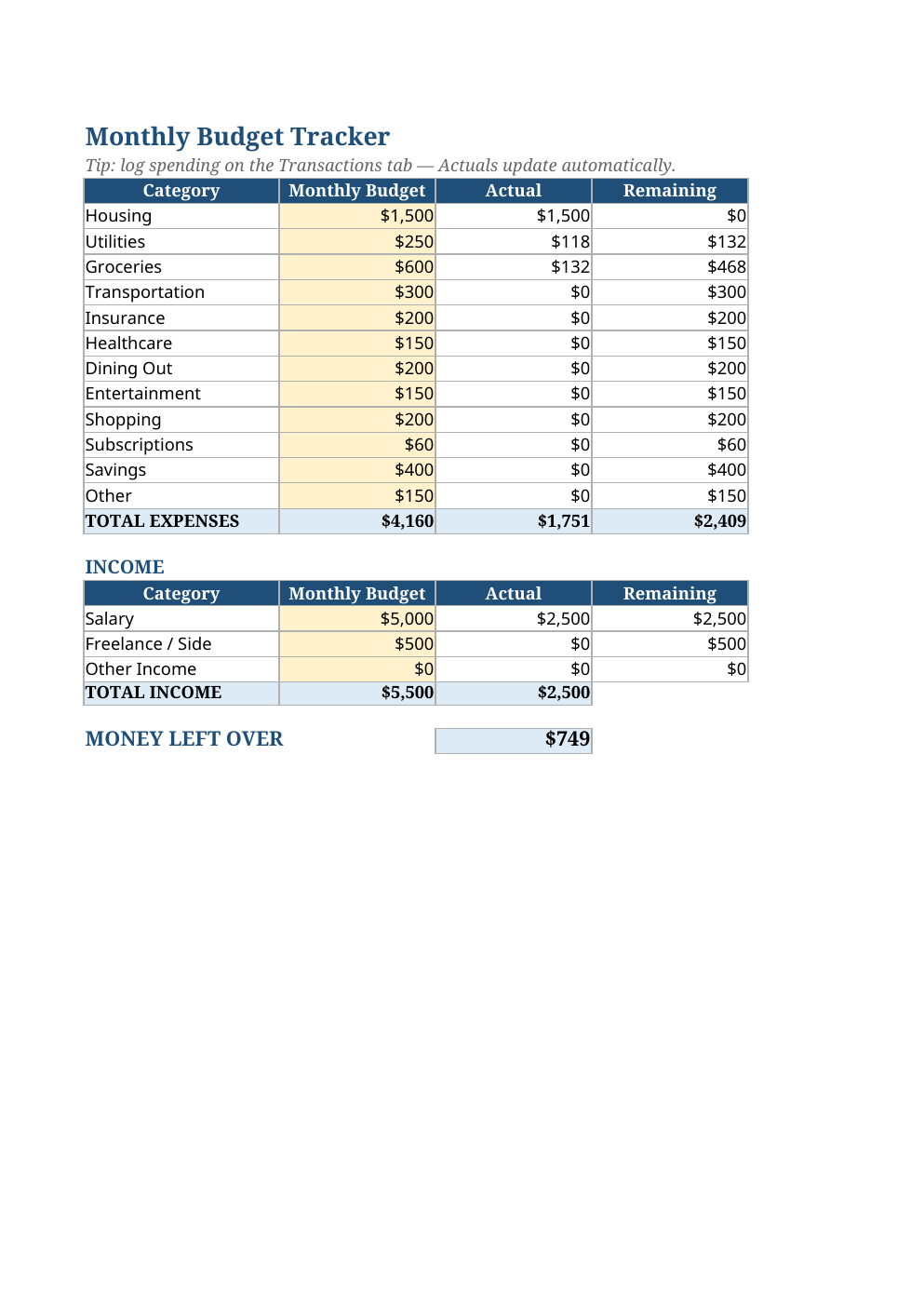
- Two sheets: a Budget dashboard and a Transactions log with category dropdowns
- Automatic Actuals via SUMIFS — type a transaction and every total updates
- 12 expense categories plus income tracking with a Money Left Over summary
- Red highlighting the moment any category goes over budget
- Yellow input cells show exactly where to type — everything else is formula-driven
Opens in Microsoft Excel, Google Sheets, and LibreOffice. No signup, no watermarks.
How to use this template
Start on the Transactions tab: each time money moves, add a row with the date, a description, the category (pick from the dropdown), whether it is income or expense, and the amount. A few example rows are included so you can see the format — delete them or leave them, your call.
Flip to the Budget tab and set your monthly budget per category in the yellow cells. The Actual column fills itself from your transactions, and Remaining shows what is left. If a category goes negative, it turns red — that is your cue to adjust.
At the bottom, the Money Left Over figure is the single number that matters: total income minus total expenses for the month. Check it weekly. Small leaks — subscriptions you forgot, dining out creeping up — show up here first, while they are still easy to fix.
Frequently asked questions
Is this budget template really free?
Yes. Download it, use it forever, no account or payment. It is supported the same way as our free tools — advertising on the site.
Does it work in Google Sheets?
Yes. Upload the .xlsx to Google Drive and open with Google Sheets; the SUMIFS formulas and dropdowns carry over. It also works in LibreOffice and Apple Numbers (via import).
Can I add my own categories?
Absolutely. Add a row to the Budget sheet, type the category name, and make sure the same name appears in the Transactions dropdown list. The formulas key off the name, so keep spelling consistent.
How is this different from a budgeting app?
Your data stays in a file you own — no bank connections, no subscriptions, no data harvesting. If you like full control and zero fees, a spreadsheet wins.