Free Profit & Loss Statement Excel Template
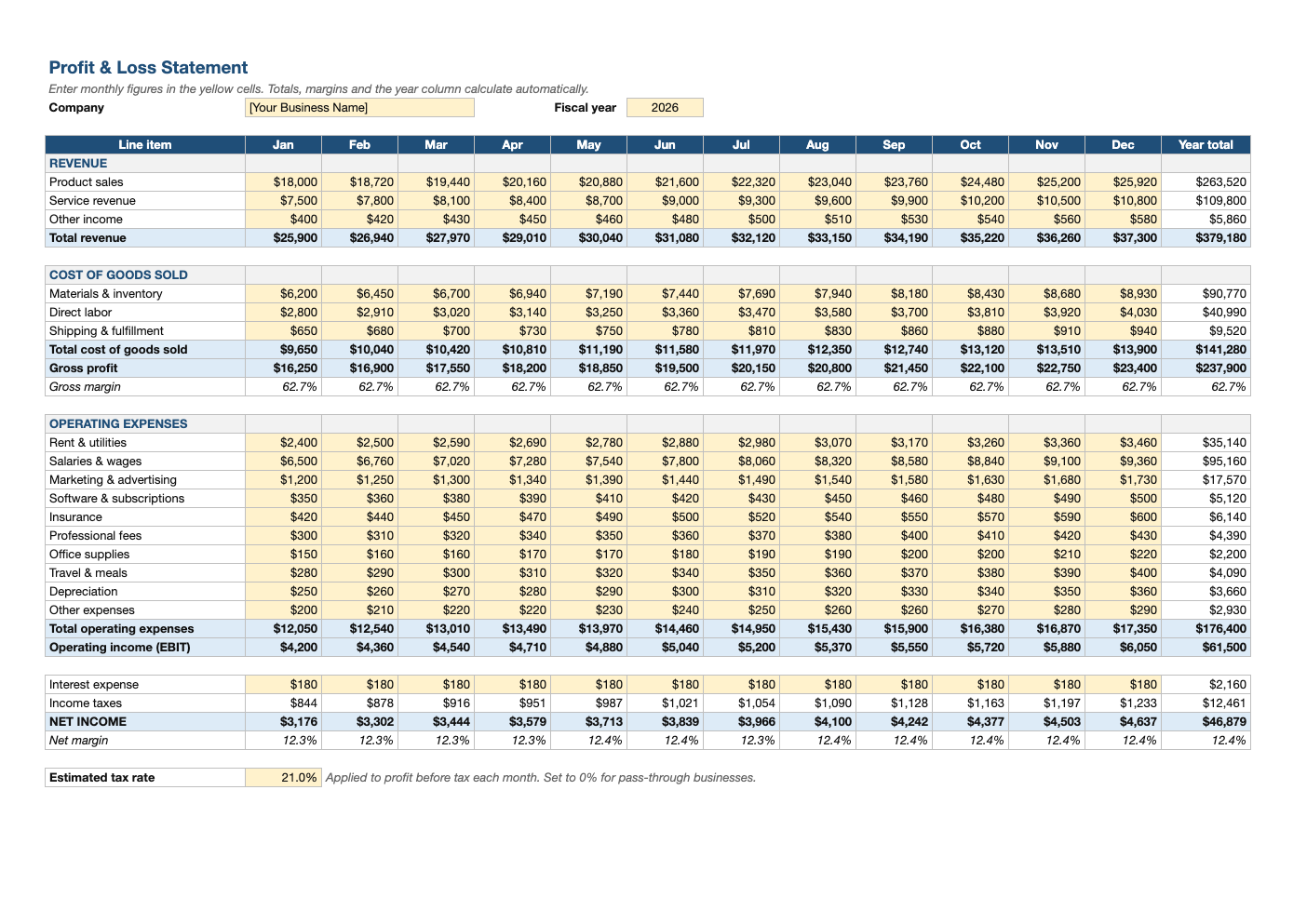
See whether your business is actually making money, month by month. Enter revenue and expenses and the P&L calculates gross profit, operating income, taxes and net income, with margins and a full-year column.
What's inside
- 12 monthly columns plus a year-total column for every line
- Revenue, cost of goods sold and 10 common operating expense lines (rename any of them)
- Automatic gross profit, gross margin %, operating income (EBIT) and net income
- Adjustable estimated tax rate, set to 0% for pass-through businesses
- Negative months highlighted in red, print-ready landscape layout
Opens in Microsoft Excel, Google Sheets, and LibreOffice. No signup, no watermarks.
How to use this template
Start at the top with revenue. Each yellow cell is an input: enter what you actually earned in each month, split however suits your business (product sales, services, other income). Rename the line items freely; the totals reference ranges, not labels.
Cost of goods sold is the direct cost of what you sold: materials, inventory, direct labor and fulfillment. Revenue minus COGS is your gross profit, and gross margin shows what share of each sales dollar is left to cover overhead. Watch that percentage over time; a falling margin often signals rising supplier costs or too much discounting.
Operating expenses are the costs of running the business regardless of sales volume: rent, salaries, software, insurance and marketing. Gross profit minus these is operating income. Interest and an estimated income tax are subtracted last to reach net income, the bottom line.
Fill in each month after you reconcile your bank and card statements, and compare months side by side. A P&L shows profitability, not cash: a profitable month can still leave your bank account short if customers pay late. Pair it with the cash flow statement template to see both.
Frequently asked questions
Is this P&L template really free?
Yes. Download it, use it as often as you like, and share it with your team. No account, no email, no watermark. The site is supported by advertising.
What is the difference between a P&L and a cash flow statement?
A P&L shows revenue and expenses when they are earned or incurred, so it tells you if the business is profitable. A cash flow statement shows when money actually moves in and out of the bank. You need both.
Should I enter the tax rate?
If your business is a C corporation, enter your estimated rate (the federal corporate rate is 21%). For sole proprietors, LLCs and S corps, profits pass through to your personal return, so set it to 0% and use our self-employment tax calculator instead.
Does it work in Google Sheets?
Yes. Upload the .xlsx to Google Drive and open it with Google Sheets; the formulas, dropdowns and conditional formatting carry over. It also works in LibreOffice Calc and Apple Numbers.