Free Sales Tracker & Simple CRM Template
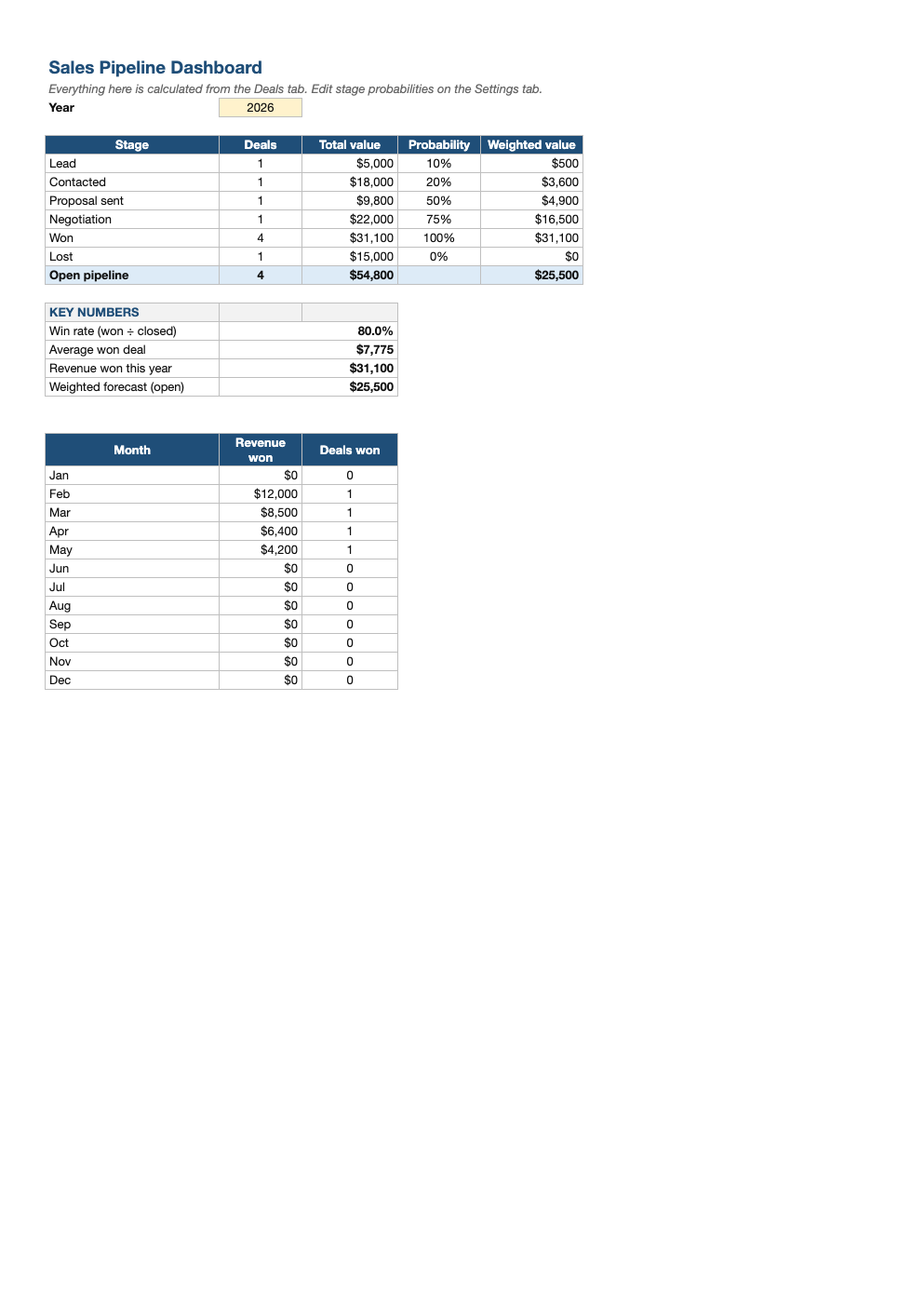
A lightweight CRM in a spreadsheet. Log each deal with its contact, value and stage, and the dashboard shows your pipeline by stage, a weighted forecast, win rate, average deal size and revenue won each month.
What's inside
- Deals tab with company, contact, email, phone, stage, value, rep, expected and actual close dates, and next step
- Stage dropdown (Lead → Contacted → Proposal → Negotiation → Won / Lost)
- Weighted value per deal from editable stage probabilities on the Settings tab
- Dashboard: deals and value by stage, open pipeline, weighted forecast, win rate and average won deal
- Revenue and deals won by month for the selected year
Opens in Microsoft Excel, Google Sheets, and LibreOffice. No signup, no watermarks.
How to use this template
Add a row on the Deals tab for every opportunity as soon as it appears. Record who you are talking to, the estimated value, the rep who owns it and what happens next. The Next step column is the most important one: every open deal should have one.
Move deals through the stages from the dropdown. When a deal closes, set the stage to Won or Lost and enter the close date; won deals then appear in the monthly revenue table on the dashboard.
The weighted value multiplies each deal's value by the probability for its stage (10% for a lead up to 75% in negotiation by default). Adding these up gives a more realistic forecast than the raw pipeline total. Adjust the probabilities on the Settings tab to match your own history.
Review the dashboard weekly. A healthy pipeline usually needs about three to four times your sales target in open deals. A low win rate points to qualifying problems; a pile of deals stuck in one stage points to a follow-up problem.
Frequently asked questions
Is this sales tracker really free?
Yes. Download it, use it as often as you like, and share it with your team. No account, no email, no watermark. The site is supported by advertising.
Is a spreadsheet CRM enough?
For a solo seller or small team with up to a few hundred deals, yes. When you need email tracking, automation or many users editing at once, a dedicated CRM becomes worth it, and this data imports easily.
How do I track commissions?
Use the Rep column to filter won deals by person, then try our sales commission calculator for flat or tiered rates.
Does it work in Google Sheets?
Yes. Upload the .xlsx to Google Drive and open it with Google Sheets; the formulas, dropdowns and conditional formatting carry over. It also works in LibreOffice Calc and Apple Numbers.