Free Vehicle Maintenance Log Template
Keep your car on schedule. Enter your current mileage and when each service was last done to see what is due by miles or by date, and keep a complete service history with costs.
What's inside
- Vehicle details and current mileage at the top
- 12 common services with mileage and time intervals
- Next due by miles and by date, with Overdue / Due soon / OK status
- Service history log with date, mileage, shop and cost
- Total spent on maintenance
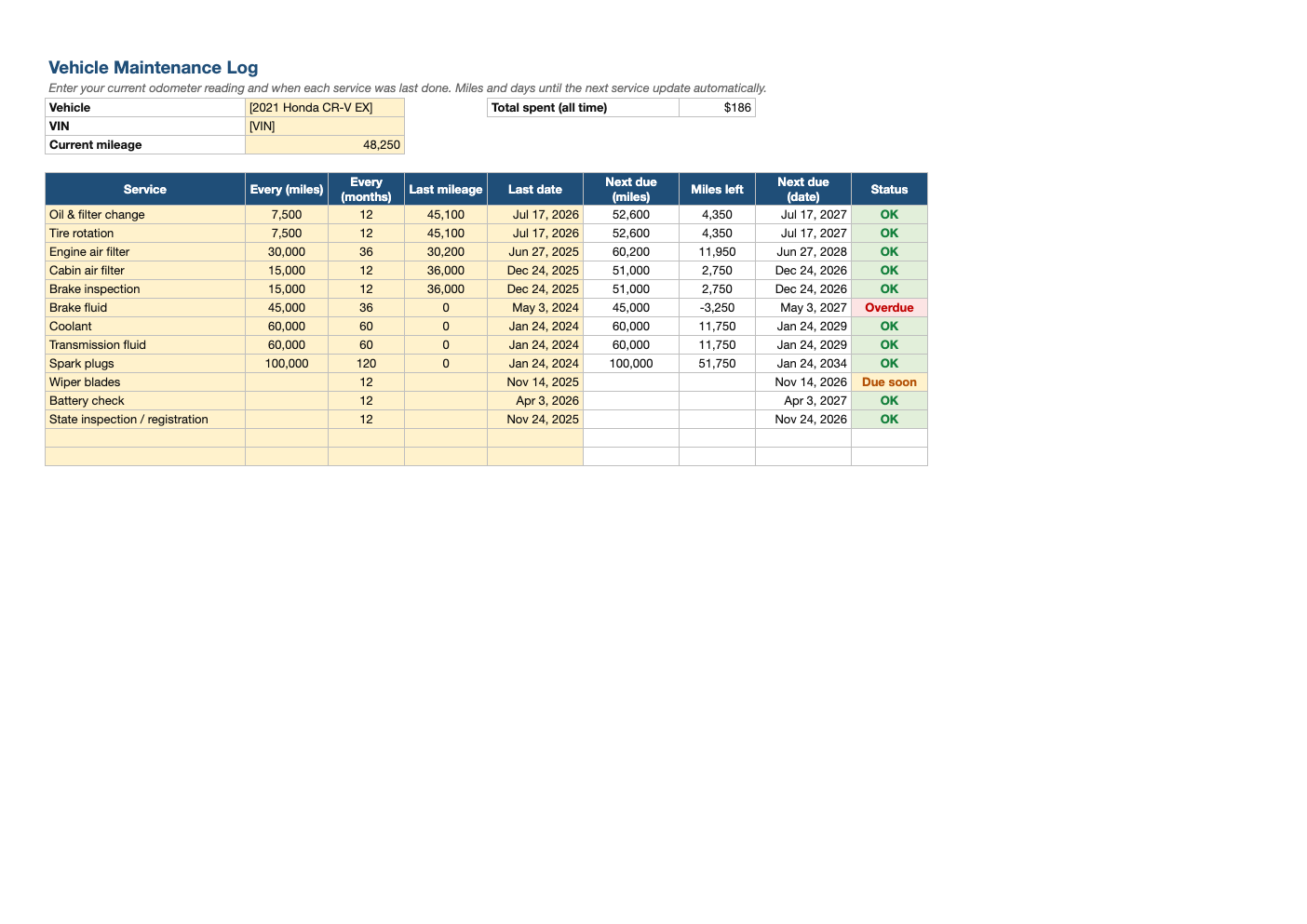
Opens in Microsoft Excel, Google Sheets, and LibreOffice. No signup, no watermarks.
How to use this template
Enter your vehicle details and current odometer reading. Check the intervals against your owner's manual and adjust them; many modern cars use synthetic oil with 7,500–10,000 mile intervals.
For each service, enter the mileage and date it was last done. The sheet calculates when it is due next by both distance and time, whichever comes first.
Update the current mileage when you fill up or monthly. Anything within 1,000 miles or 30 days of being due turns yellow.
Log every service on the Service Log tab. A complete history helps resale value and can matter for warranty claims.
Frequently asked questions
Is this vehicle maintenance log really free?
Yes. Download it, use it as often as you like, and share it with your team. No account, no email, no watermark. The site is supported by advertising.
How often should I change my oil?
Follow your owner's manual. Many newer cars using synthetic oil specify 7,500–10,000 miles or once a year.
Can I track more than one car?
Yes. Copy both tabs for each vehicle, or keep one file per car.
Does it work in Google Sheets?
Yes. Upload the .xlsx to Google Drive and open it with Google Sheets; the formulas, dropdowns and conditional formatting carry over. It also works in LibreOffice Calc and Apple Numbers.